Saturday, August 2, 2008

Thing #8: Share Your Creations


Well, I'm not sure what my personal future will be like in the world of Library 2.0, if the very hallmark of 2.0 is sharing! The whole sharing, look-at-me and "what I can show you of every part of my life" feature of 2.0 is what I truly dislike about the whole deal. However, if I focus on the fact that it is the Library's services, collections and programs, etc. that will be shared then it makes more sense to me. It then becomes just another marketing tool.

Out of the optional choices to try for sharing online, I originally wanted to try creating a database of books that I would like to read. However, the only datbasesite that Thing #8 recommended, Lazybase, did not seem to create a very nice looking database. So I decided to once again try a photo option, and I chose Slideshare. I chose the Moving Thumbnails option to showcase 8 photos I have taken, and have posted the show to the blog, as you can see above.

Using Slideshare was fairly easy to navigate and understand. However, as usual I always have some difficulty getting the images posted to my blog. I always have to look up the instructions!

Friday, August 1, 2008

Thing # 7--Web 2.0 Communication Tools

Obviously, I have been using a few of the web communication tools for quite a while, but others I am totally new to. Let's review, shall we!

Email: At work we use email heavily to handle reference questions, some of which fall into the ready reference category and some more in-depth. There is a team of 4 librarians who are responsible for handling the Reference email account, and it can have an average range from 30 to 5 emails per day. I feel it has been a successful tool for handling research questions, and while the team doesn't look at the email constantly we do try to monitor it twice a day at the minimum, so researchers normally receive an answer with 24 hours at the latest, (with the exception of the two days the library is closed.) I do feel that it has offered our patrons another viable option for contacting the Library and getting some quick information. Personally, in terms of handling my own email I learned long ago to disable the notification system and look at my in-box only once an hour so that I don't get involved with it all day. I also have my options set so that my delete box empties automatically when I close my email, and I try to keep my sent mail and my in-box current so that they are normally only holding messages from the last 30 days.

IM: this is a feature that our Library has been looking into as a reference option we could offer our researchers, but we have come across some road blocks. I was part of a group that visited a similar special library to see how they had incorporated IMing into their service, and I think it could provide some possibilities for us. However, most of the staff, including myself, is not familiar with IMing, so our first step would be, as 23 Things suggest, to try amongst ourselves first. However we have met real resistance from our IT staff, and they will not at this time enable us to even just communicate amongst the librarians. So we really can't go any further until that problem is resolved. I realized, watching the video of the UB's instant messaging service, that there is a whole new lingo to learn with all the abbreviations! Staff also has concerns about how busy IMing would get, but I feel that is a variable that we won't be certain about until we can offer the service and see what happens!

Texting: while my cell phone offers the feature I never text anyone. My stepsons, however, at the ages of 25, 21 and 17 never put their phones down and their fingers fly! Reading the article about texting and libraries pointed out an obvious feature that I was wondering about--unless the text message can come through the computer I don't really see it being a viable reference tool, as what does everyone do--walk around with a cell phone? I do like the silent aspect of texting, however. I did text a friend on my cell for this Thing, and not only did it take me forever to type a very brief message on those tiny keys, but where's the punctuation! I definitely need to brush up on the lingo for all the abbreviations! I don't even think I remembered to sign my name when I texted my friend.

Webinars: I have attended several MINITEX webinars, and find the format of the presentations usable. I appreciate the tips in the WebJunction article about making sure that the steps for helping the participant get the webinar up and running are clear. I will say that it seems that more often than not there is some technical glitch when getting connected for the webinar. At my library we have discussed the possibility of turning some of our regularly presented classes into webinars, and I think that would be a good idea. I like when I can look at archived webinars and pick a topic I am interested in learning about on my own schedule, and I think our users would as well.

While some of the communication tools were new to me, this is one Thing that I felt fairly comfortable with.

Wednesday, June 25, 2008

Thing # 6--Online Image Generators

Well, I think I am now truly past the Flickr steps, and I have to admit that I did have some fun playing around. I created a trading card for the famous MN racehorse Dan Patch, that is available to your right. As I mentioned in my previous blog entry for Thing #5, I can see all sorts of creative uses for these tools in the Library--perhaps more in my previous life as a children's librarian than as a reference librarian. However, as I also mentioned before, my library is looking at creating trading cards for MN governors. It just so happened that I was working on this step during a quiet time on a reference desk shift and our acquisitions librarian was on the desk with me. He has been busy creating a list of "150 great MN books" for the sesquicentennial, and while watching me work on the Dan Patch trading card he said "I should do trading cards for the 150 books!". Excellent idea. While I understand that the purpose of these tools are for use on web sites, I also think a nice, full-colored print version of trading cards, no matter what the subject, would be popular as well.

Tuesday, June 24, 2008

Thing #5--More Flickr Fun

Well, I thought I was done with Flickr, but not quite yet! It was fun to play around with the mash ups, and you can see that I spelled my name with Spell with Flickr and put it up front and center for the moment! Clockr wasn't providing any change of images today--I don't know if that is a standard thing or if something isn't working right. If I remember, I'll check it on another day. Flickr Color Pickr was fun--I'm not sure of the value of choosing images by color, except perhaps for the graphic design fields. Big Huge Labs was helpful in that it pulled all these options together into one site. Obviously, I enjoyed Spell with Flickr and it was entertaining to go through splashr and see all the different options for how your Flickr page could look. (I flirted with the postcard set-up, but went back to the plain old traditional page.) On my Flickr page I took my Tranquil Landing image, made it a jigsaw puzzle and uploaded it.

The applications might be fun to create with if one had more control over the design of the library web page. At my institution the web page design is pretty much locked down by IT--all we provide is content. These tools could certainly provide the help in designing a vibrant web page if one had free reign. I love the idea of the trading cards--as a former children's librarian I could see all sorts of possibilities in that--trading cards for favorite authors, favorite literary characters, etc. In fact, at my current library we are considering trading cards for the state governors. With all this for free, it does make me realize that interesting web creations are a possibility without too much effort.

Thing # 4--Photosharing with Flickr

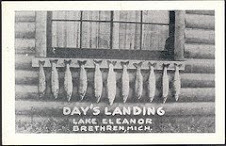
Finally, finally, finally--I am past the Flickr assignment! I enjoyed the video regarding online photo sharing, and it totally makes sense that if one was really into taking tons of photos, keeping a back-up copy on the Internet would be the smart thing to do. As a matter of fact, this may be a tool I share with my sister, who has a new digital camera and is enjoying becoming a somewhat amateur photographer. This would be a perfect storage solution for her. She is slightly less web savvy that me even, (if that's possible), so I will need to explain it to her. But now having used Flickr, it is fairly easy to understand. However, I did need to refer to my notes taken during one of our Library 2.0 sessions when Jen discussed Flickr, as when you are on the page nothing appears to be intuitive to me. But I created an account and successfully uploaded, titled, described and tagged a photo of mine (the same one on this blog). I then searched Flickr for some other images of the Manistee River, and found some interesting stuff. In fact, over on the left are two photos that I particularly liked--the Day's Landing on Lake Eleanor in Brethren (created by D. M. Day) is fun because of the family name connection, although not an actual relative. I love the photo of the freighter coming into the Manistee River channel at night, (taken by Open Lake Group LLC), because it is always an exciting time to hear the ship's horn and know that another big lake freighter is in town.
I can certainly see the many benefits of using Flickr to create buzz for your library. In fact we are working on a library tour, and Jen uploaded some 28 photos that I took of the Library onto our Library's account last week. With the search capacities of Flickr I can envision all sorts of ways that Flickr users may stumble upon our Library tour. I obviously understand the benefits of the storage aspect, and if I was a big photo nut I would probably use that aspect of Flickr. The private verses public debate is where I sort of lose interest--again I just don't get into the concept of everyone looking at my private images. So if I did use Flickr for myself, I would more than likely use the private option. Obviously, for institutional uses the public aspect of Flickr is what it is all about, and that makes sense, too.
All in all, an overall useful tool. By the way, in a follow-up to Thing #3, I never got the RSS email feed to work--I must be doing something wrong.

Wednesday, June 4, 2008

23 Things on a Stick-Round 2: Thing #3 again!

Well, well, well....I hadn't realized that I haven't done anything since March 11Th. Pathetic. I read through my last post, and also realized that I hadn't signed up for SendMeRSS as an alternative to an aggregator. So, I signed up for that today and put two URL's in for feeds to my email. We will see how that goes and I will report back this time. (At least I have good intentions to do so!) I have also re-registered my blog for the second round of competition. At my library we are planning to meet once a week to discuss a "thing", so I am really hoping that by doing that I will stay motivated and perhaps finish this project. I'm off now to discover what Thing #4--I'll be back!

Tuesday, March 11, 2008

Thing # 3--Set up an RSS account

Setting up an aggregator account on Bloglines wasn't too difficult, and I now have 10 feeds. Several of the feeds are my co-workers' blogs for the 23 Things on a Stick program, and the rest are primarily of personal interest--such as my local library's RSS feed and a few other blogs that I like to keep up on. I also have a few that tie into work, such as Eastman's Online Genealogy Newsletter. We had a brief presentation at work by more experienced colleagues about using aggregators, and I was surprised to see how many feeds some people have! I can't think of 60 sources that I would like to be getting continuous updates from! Since I have so few sources, and adding to them would just increase my stress level, it almost makes sense to have feeds coming direct to my email, as opposed to using an aggregator. I just never remember to visit the aggregator, either. It just so happens that the ALA Direct e-newsletter for either the last week of February or 1st week of March provided a link to a great resource titled 14"Other" Ways to Make Use of Web Feeds . According to this article, SendMeRSS can take any feed and forward updates to your email. It checks for updates at least once in every two hours so whenever something new gets published it lands in your inbox within at most 2 hours. I'm going to try this system out and see if I like having feeds sent to my email instead of trying to remember to go to Bloglines and check what's happening in my aggregator. I'll update my blog with the results.